
Documentation / LastHelp / Getting started
Install
On this page
One command
curl -fsSL https://git.codigosh.com/CodigoSH/LastHelp/raw/branch/main/install.sh | sudo shIt downloads a release, checks that it is ours before installing anything, and sets up a hardened systemd service. Read it first if you would rather — it is one file, and piping a script into a root shell is a thing to do knowingly.
What it refuses rather than warns about:
- A checksum file whose signature does not match a key it knows.
- A binary that does not match the signed checksums.
- Not having
openssl, because an unverified binary is not worth the convenience of installing without it. - Having an
opensslolder than 3.0. Verifying an ed25519 signature from the command line needspkeyutl -rawin, which 1.1.1 does not have — and there is no other way to do it there, so the script says so plainly instead of failing with a message about an unknown option. Anything from Ubuntu 22.04, Debian 12 or RHEL 9 onwards is new enough.
Run it again to update. It stops the service, backs up the database first,
replaces the binary and starts again — and it keeps the port and the
configuration it finds rather than asking twice. The one file it never
overwrites is /etc/lasthelp/lasthelp.env, because that is the one you have
edited by hand.
It tells you which version you have and which it is about to install
(Updating v1.2.5 → v1.2.6). If you already have the latest it says so and
stops, touching nothing: no download, no backup, no restart. To install it again
anyway — to repair a damaged binary, or to answer the questions differently —
add --reinstall:
curl -fsSL https://git.codigosh.com/CodigoSH/LastHelp/raw/branch/main/install.sh | sudo sh -s -- --reinstallIt answers --help, and it can undo itself. The installer leaves no copy of
itself on your machine, so fetch it again and hand the option over with -s --:
curl -fsSL https://git.codigosh.com/CodigoSH/LastHelp/raw/branch/main/install.sh | sudo sh -s -- --uninstall           # removes it, keeps the reports
curl -fsSL https://git.codigosh.com/CodigoSH/LastHelp/raw/branch/main/install.sh | sudo sh -s -- --uninstall --purge   # erases them too, after you type DELETE
If you saved the script to a file, sudo sh install.sh --uninstall does the same.
It asks three questions — port, release channel, reverse proxy — and remembers
the answers, so an upgrade never asks twice. Where there is no terminal to ask
on, every answer is its default and the environment supplies the ones that
matter: LASTHELP_CHANNEL=beta for the beta channel, LASTHELP_PORT for the
port.
Every path it writes to can be pointed elsewhere the same way —
LASTHELP_PREFIX, LASTHELP_DATA, LASTHELP_ETC, LASTHELP_UNIT — which is
how it gets tested against a throwaway tree.
What it installs, and where
/opt/lasthelp/bin/lasthelp | the binary, owned by the service account so it can update itself |
/var/lib/lasthelp/ | the database, and the backups taken before each update |
/etc/lasthelp/lasthelp.env | the configuration, yours to edit |
/etc/systemd/system/lasthelp.service | the unit, taken from the release and covered by its signature |
The unit is not written by the installer: it ships with the release and is
listed in the signed SHA256SUMS alongside the binary, so the sandbox it puts
the service in is verified rather than being whatever the copy of the installer
you happened to run had inside it.
With Docker
docker run -d --name lasthelp \
  -p 8080:8080 \
  -v lasthelp-data:/data \
  --restart unless-stopped \
  git.codigosh.com/codigosh/lasthelp:latest
The image is published for linux/amd64 and linux/arm64 with every release.
latest moves with each stable release and beta with each prerelease. It runs as uid 10001: a named volume works as it is, a directory bound from
the host has to belong to that user (chown 10001:10001 ./data). To update,
pull the new image — the binary inside does not replace itself.
Or with the compose file in the repository:
docker compose up -dOpen http://localhost:8080. An unclaimed instance opens on the setup wizard
rather than hiding it behind a sign-in link: three steps — the language and the
look, the administrator account, and what this installation calls itself.
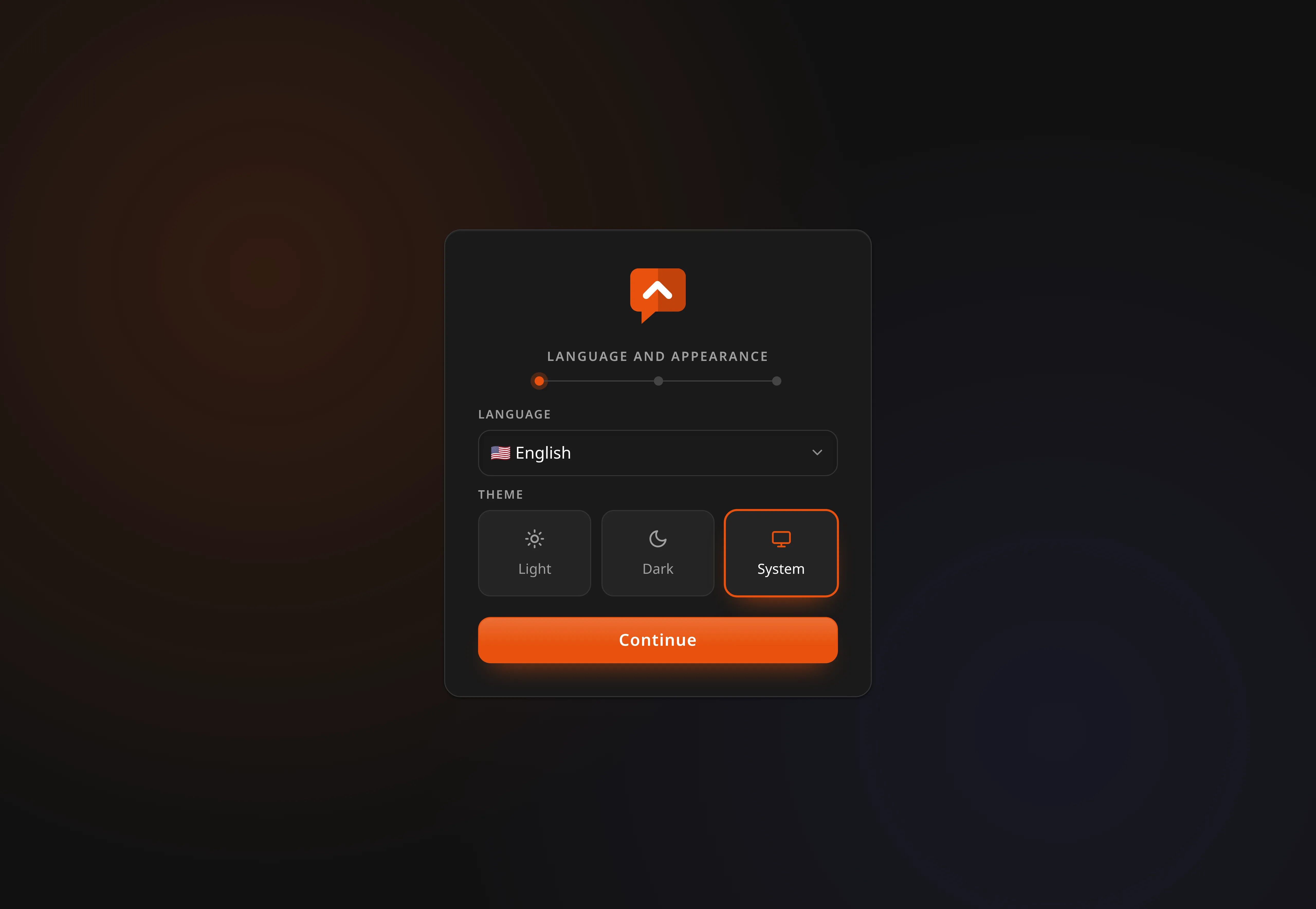
The first account created is the administrator, and setup then refuses to run again. Anybody who finds an unclaimed instance before you do becomes its administrator, so claim it before you put it on the internet.
It asks for a username, not an email address. Nothing is ever sent to it, and the second password box is the one thing standing between a typo and an installation nobody can sign into — there is no reset here.
From source
Requires Go and bun.
make build   # frontend and binaries into bin/
./bin/lasthelp
Where the data lives
One file. lasthelp.db holds everything: repositories, reports, votes,
accounts, and the forge token this server uses to open issues.
That file is the thing to protect. Passwords are hashed and cannot be read back, but the forge token and the webhook secret are in there as they were given, because a key kept on the same machine as the database protects against nobody who can reach the machine. Copy it somewhere only you can read, and treat a copy that leaves this server as a copy of your forge credentials.
Upgrading from Beta.03 or earlier? Those versions encrypted the token with a
lasthelp.keyfile next to the database. The first start after upgrading moves the values across and says so in the log —encrypted values from an earlier version moved into plain columns. After that the key file is read by nothing and you can delete it. If you had already lost it, the log says that instead, and you paste the forge token again in the panel.
Settings
Every environment variable this binary reads is listed in .env.example, and an
architecture test fails the build if one is missing from it or if that file
invents one the binary does not read. The ones worth knowing about:
| Variable | Default | What it does |
|---|---|---|
LASTHELP_PORT | 8080 | Listening port. LASTHELP_ADDR takes a full address instead |
LASTHELP_DB_FILE | lasthelp.db | The database |
LASTHELP_KEY_FILE | beside the database | Only for upgrading: where a pre-Beta.04 install kept its encryption key |
LASTHELP_PUBLIC_URL | empty | Where this instance is reachable, for the links in notifications and feeds, and for the share image in link previews |
LASTHELP_TRUST_PROXY | false | Turn on only when a reverse proxy really is in front |
LASTHELP_TRUST_PROXY_HOPS | 1 | How many proxies |
LASTHELP_OFFLINE | false | Stops every outbound connection |
About LASTHELP_TRUST_PROXY
With it on and no proxy actually in front, a caller can put whatever they like in
X-Forwarded-For and choose the address their requests are attributed to — which
means the rate limits stop meaning anything. LastHelp reads the entry your
proxy appended, not the leftmost one, so it is safe when the setting is true and
a proxy is really there, and only then.
About LASTHELP_OFFLINE
It stops the forge calls, the notifications and the update check. It exists so the claim that this server only talks to what you configured is something you can check rather than take on trust: turn it on, and if anything still reaches the network, the documentation is wrong.