
Lastboard Documentation
On this page
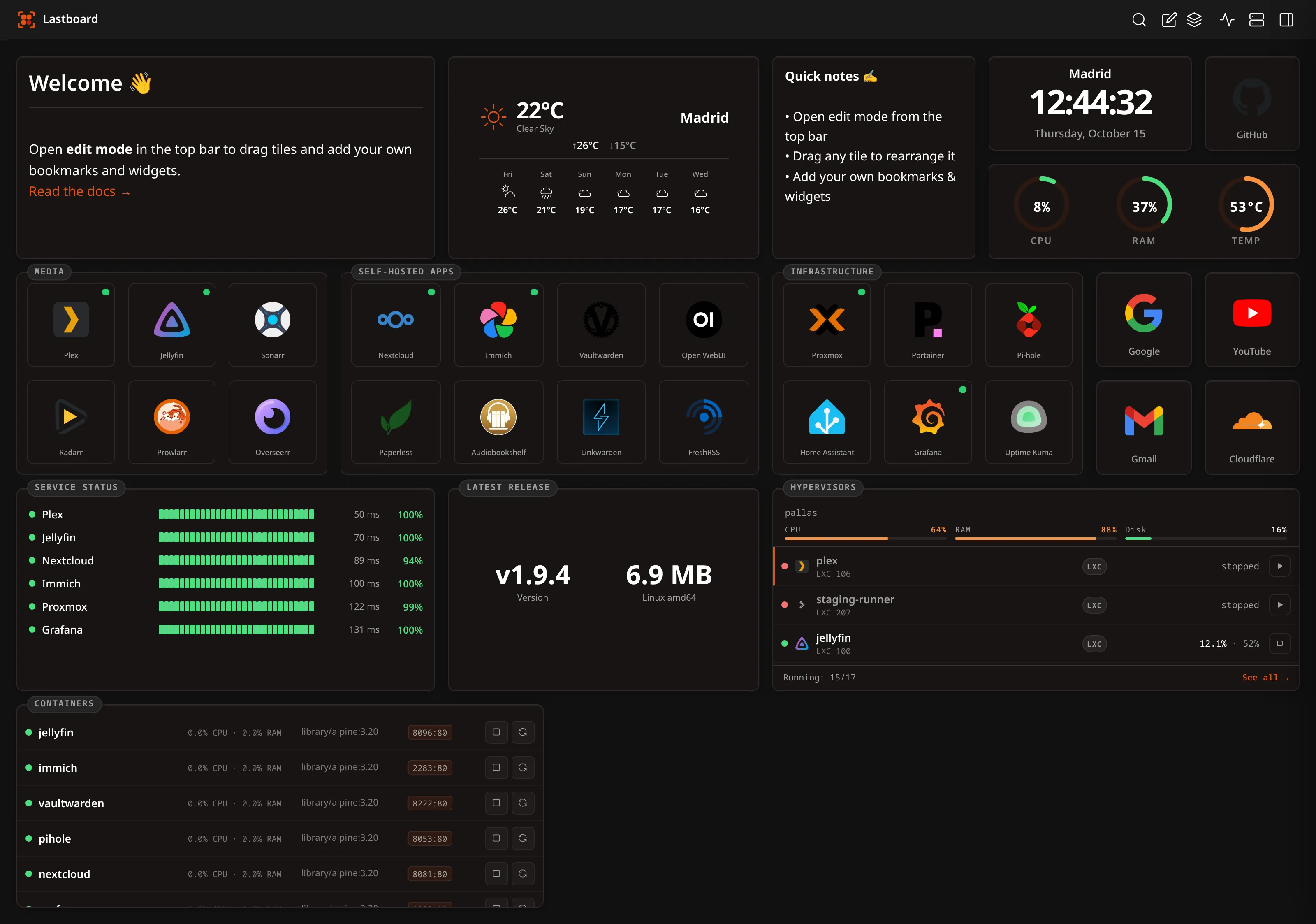
Lastboard is a self-hosted dashboard and homelab startpage: bookmarks with live up/down indicators, widgets, 24/7 uptime monitoring with alerts, Docker container control and a Proxmox VE view — in one Go binary with one SQLite file beside it. No database server, no message broker, no external cloud, no account anywhere.
New here? Go to Installation. This page is the map of everything Lastboard does and where each part is documented.
What Lastboard is
| Shape | One static binary (linux/amd64, linux/arm64) or one Docker image |
| Storage | A single SQLite file — back it up by copying it |
| Dependencies | None to install. The frontend ships zero runtime JavaScript dependencies; the backend links a pure-Go SQLite driver, so there is no CGO and no system library to match |
| Footprint | Small enough for a Raspberry Pi or a 512 MB LXC container |
| First run | A three-step wizard in the browser. There is no configuration file to write |
| Licence | Apache-2.0, free and open source |
| Data leaving your server | Nothing, by default. See Security Overview |
The board
The dashboard itself: a grid you arrange, and the tiles on it.
- A native drag-and-drop grid, written from scratch — no grid library. Drag a tile anywhere, resize it from its bottom-right corner a cell at a time. An outline shows where it will land and turns red when the target is occupied: nothing is ever pushed aside behind your back, and a drop onto a taken cell is simply refused.
- Bookmarks — a tile that launches a service, with an icon, a label you can place above, below, inside or hide entirely, a border colour and width of its own, and an optional status dot in any corner that says whether the service answers.
- Sections — a container that groups bookmarks under a title. Drop tiles inside and they travel with it: move the section to another dashboard and its contents go too.
- Widgets — nine of them, listed below, each resizable and configurable in place.
- Multiple dashboards per user, each with its own layout and items, switched from the top bar, reorderable, and with one marked as the one that opens first.
- Move items between dashboards — one at a time from a tile’s menu, or many at once with the selection mode in the top bar. Items are auto-placed on arrival and briefly highlighted so you can see where they landed.
- Live search in the top bar filters the board by label as you type. Press Ctrl+K (Cmd+K on macOS) to jump to it from the keyboard.
- A mobile layout with an order of its own. Phones get a simplified touch layout, and which bookmarks appear there — and in what order — is set independently of the desktop grid, from a bottom sheet that only commits when you tap Save changes.
- Grid density from 3 to 16 columns, per user.
→ Bookmarks · Dashboards
Widgets
Nine widgets ship in the box. Each one starts its General tab with a Title: a name shown on the tile’s top border, like the one a section wears. Leave it empty and the tile wears no name. Each one also has a Personalize tab with a border colour and border width, on top of its own options.
| Widget | What it does | Configuration |
|---|---|---|
| Clock (Time) | The time and date for a city you search for, on that city’s time zone. Several clocks, several cities | 12/24 h, date, city, seconds |
| Telemetry (Server Health) | CPU, RAM and temperature as ring gauges — of the machine Lastboard runs on with no agent and no exporter, or of another server through Glances, Netdata or a JSON endpoint | Source, which gauges, redraw rate |
| Weather | Current conditions and an optional multi-day forecast from Open-Meteo. No API key | Coordinates, forecast days |
| Notepad | A rich-text scratchpad with a toolbar: headings, colours, lists, checklists, links, images | None — you write in it |
| Markdown | A Markdown block rendered on the board, with a source/preview toggle | None — you write in it |
| Monitoring | Your monitored services on a tile: status dot, heartbeat, latency, 24-hour uptime | Which services, refresh |
| Docker | Containers from one or many hosts, with live CPU/RAM and start/stop/restart | Hosts, which containers, refresh |
| Proxmox | The busiest node’s health and the machines that need attention, with start/shutdown | Title, node health, refresh |
| API | Any JSON endpoint as a tile — as big metric numbers or as a scrolling list | Preset or fully manual |
The API widget is the escape hatch: 16 guided presets (AdGuard Home, Paperless-ngx, Immich, Jellyfin, Sonarr, Radarr, SABnzbd, Tautulli, Overseerr/Jellyseerr, Bazarr, Prowlarr, Home Assistant, Uptime Kuma, Forgejo/Gitea, Speedtest Tracker, Nextcloud) where you fill one to three fields, and an Advanced mode for anything else: URL, method, headers, field paths and number/bytes/percent formatting. The request runs on the Lastboard server, so it reaches private IPs and accepts self-signed certificates.
Uptime monitoring
Built in, not bolted on. Give a bookmark a URL and a status position and Lastboard probes it.
- Two modes. Tab mode (the default) checks while somebody has Lastboard open — live dots, nothing recorded. 24/7 mode runs a server-side scheduler that keeps probing whether or not anyone is looking, which is what makes history and alerts possible.
- Check interval of 1, 5, 10 or 30 minutes.
- History kept for 30 days, pruned daily.
- A status page listing every monitored service with its state, a strip of recent checks and its 24-hour uptime, searchable, opened from the top bar.
- Per-service detail over 24 hours, 7 days or 30 days: uptime percentages, current and average response time, a latency chart with a hover crosshair, a heartbeat strip, and a table of outages with duration and whether the service recovered.
- Alerts on the way down and on the way back up, via ntfy, Gotify or a webhook, with a configurable failure threshold (1, 2, 3 or 5 consecutive failures) so a blip does not wake you, and a Send test button to prove delivery before you rely on it.
- Private services just work — the probe runs from your server, so
10.x,192.168.xand.localaddresses and self-signed certificates need no extra configuration.
→ Monitoring & Uptime · Monitoring widget
Docker
- Three ways to connect: the local socket (native install or a mounted socket in Docker), remote TCP or TLS, or the Lastboard Agent — a tiny token-authenticated bridge, so you never have to expose the Docker daemon on the network.
- Many hosts in one widget: tick the containers you care about on each host and they all appear in one list, each row naming the host it runs on.
- Live state and resource use, with the same status dot the Monitoring widget uses.
- Start, stop and restart from the row — administrators only.
- A container’s name is a link. The address is worked out from what you typed, then from a
lastboard.urlorhomepage.hreflabel on the container, then from its first published port — so containers already labelled for another dashboard work here unchanged. - A host that stops answering does not make its containers vanish: they stay, greyed out, and the host line says it is not responding.
Proxmox VE
Lastboard reads your hypervisor with a read-only API token (power control is optional) and shows it beside the services it runs.
- As many hypervisors as you run. Each is connected on its own terms, with its own token and certificate policy. With more than one, the page opens on a short summary — a card each, and the bookmarked services that are down across all of them — and you go into whichever you want.
- A full page per hypervisor: node CPU/memory/disk with load average and uptime, every storage with how full it is, and every virtual machine and container as a tile with a 24-hour CPU trend line. Each node folds away, which is what keeps a cluster readable.
- Machines are tied to bookmarks automatically, by name and by the icon a bookmark wears,
with the leading ordinal (
15-myspeed) stripped and a strict “only when exactly one bookmark fits” rule — measured on a real host of 29 containers and 55 bookmarks: 16 matched, none wrongly. Where no rule should guess, you name the machine on the bookmark itself. - That is the point of it: a stopped container does not just say stopped, it says which service it takes with it — every stopped tile turns a soft red, the ones serving a bookmark carry its mark in the corner, and the summary names the service.
- Start and shut down a machine, with confirmation — administrators only, and only when the
token actually carries
VM.PowerMgmt, which Lastboard asks the host rather than assuming. Nodes can never be powered off from Lastboard, deliberately. - An icon for machines that will never have a bookmark — the runners, the tunnel, the container Lastboard itself runs on — chosen from the same picker the bookmarks use and stored on your own server.
- Nothing is written to your database: no machine names, no figures, no history. Only the connection itself is stored, and the token secret is never sent back to a browser.
Users and personalization
- Multi-user with per-user boards, preferences, avatar and password. Exactly one administrator — the account the wizard creates; everyone added afterwards is a Member.
- Theme: Dark, Light, or System, which follows the device and changes with it.
- Accent colour from presets or a colour picker.
- A background image per user, resized in the browser before it is stored.
- Your own panel name and logo in the browser tab and the top bar.
- Measurement units, metric or imperial, applied across every widget that shows one.
- 20 languages, hand-translated: Arabic, Bengali, Chinese, Dutch, English, Farsi, French, German, Greek, Hindi, Indonesian, Italian, Japanese, Korean, Polish, Portuguese, Russian, Spanish, Turkish and Urdu — with full right-to-left support for Arabic, Farsi and Urdu. The language is set on the server for the first paint, so the login page arrives already in your language rather than flashing English first.
- Installable as an app (web app manifest) on Android, iOS and the desktop.
Your data stays yours
- One SQLite file holds everything.
cp lastboard.dbis a complete backup. - Full backup and restore from the browser: every user, every dashboard, every setting and every stored icon, as one file.
- Export your dashboards as open, documented YAML — readable, editable, version-controllable.
- Import from Homepage (
services.yamlandbookmarks.yaml), from Dashy (conf.yml) or from a Lastboard YAML file. Import always adds dashboards; it never overwrites what you already have, and it tells you how many items it will create before it creates any. - Icons are downloaded once and served from your own server. Loading your board reports nothing to a CDN — neither your address nor, from the icons requested, which services you run. Boards built before this existed are brought in automatically when the server starts.
Security
- Sessions as HMAC-SHA256 signed tokens, passwords hashed with Argon2id, constant-time verification.
- CSRF protection on every state-changing method, and a
Sec-Fetch-Sitecheck on top. - A strict Content-Security-Policy with a per-request nonce, plus HSTS,
nosniff,X-Frame-OptionsandReferrer-Policy. - Rate limiting at 20 req/s with a burst of 50 per IP, and a login lockout after 5 failed attempts. Behind a proxy, the client IP is read from the entry your proxy appended, so the lockout cannot be evaded by forging a header.
- Signed releases.
checksums.txtis signed with Ed25519; the public half is embedded in the binary as a list, and a missing or invalid signature aborts an update. - Optional unprivileged execution with
PUID/PGID. - No telemetry, no analytics, no account. Lastboard never reports usage anywhere. Every outbound request it makes is one you asked for: probing your services, reading your Docker or Proxmox host, fetching an icon you picked, and checking our Forgejo for a new release — which goes straight there, with no intermediary.
→ Security Overview · Headers · Release Signing
Table of Contents
- Getting Started
- Using Lastboard
- Widgets
- Monitoring
- Proxmox
- Security
- Help
- Contributing