
Documentation / Lastboard / Widgets
Docker Widget
On this page
The Docker widget provides live monitoring and basic management of your Docker containers directly from Lastboard.
Description
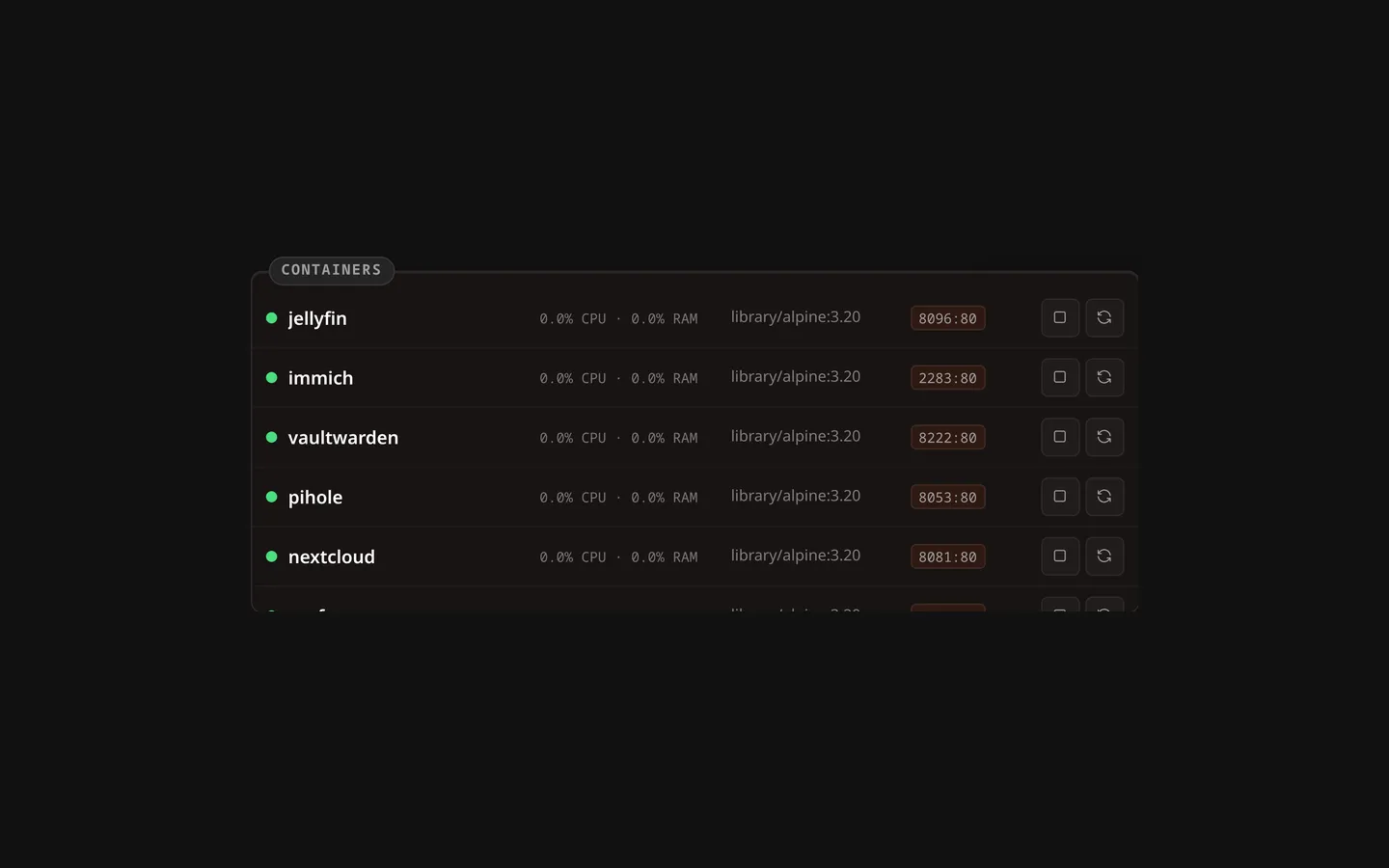
This widget lists containers, shows their running state, exposes port mappings, and provides real-time CPU/RAM stats. It also lets the administrator control container lifecycles (Start, Stop, Restart).
Prerequisites
To monitor Docker instances, Lastboard needs access to the Docker daemon.
Connection Modes
You can connect the widget to Docker environments via three distinct modes:
1. Local Socket (Native Install)
When running Lastboard natively on Linux, it can access /var/run/docker.sock directly (ensure the lastboard user has permission to read the socket, often by adding it to the docker group).
2. Local Socket (Docker Install)
When running Lastboard as a Docker container, uncomment the socket volume mount in the docker-compose.yml file to grant it access.
    volumes:
      - ./data:/var/lib/lastboard
      - /var/run/docker.sock:/var/run/docker.sock:ro  # Read-only access
3. Remote via Lastboard Agent
For remote servers, you can use the official Lastboard Agent to securely proxy Docker API calls with an authorization token, over HTTP or — behind a reverse proxy — HTTPS.
Lastboard Agent
The Lastboard Agent is a lightweight proxy that exposes specific Docker endpoints.
Quick Start
Using Docker Compose (Recommended):
services:
  lastboard-agent:
    image: git.codigosh.com/codigosh/lastboard-agent:latest
    container_name: lastboard-agent
    ports:
      - "2375:2375"
    environment:
      - TOKEN=your_secure_random_token
    volumes:
      - /var/run/docker.sock:/var/run/docker.sock:ro
    restart: unless-stopped
Using Docker CLI:
docker run -d \
  --name lastboard-agent \
  -p 2375:2375 \
  -e TOKEN=your_secure_random_token \
  -v /var/run/docker.sock:/var/run/docker.sock:ro \
  --restart unless-stopped \
  git.codigosh.com/codigosh/lastboard-agent:latest
Environment Variables
| Variable | Description |
|---|---|
TOKEN | Required: The Bearer token used to authenticate requests. |
PORT | The port the agent binds to (default: 2375). |
SOCKET_PATH | Path to Docker socket (default: /var/run/docker.sock). |
Health Check Endpoint
The agent provides a public, unauthenticated /health endpoint to verify connectivity. Since v1.1.0 it also reports the agent’s version there, and the widget’s settings show it next to each agent host — so you can tell which release each machine runs without logging into it. An agent older than v1.1.0 reports none and is shown as < v1.1.0; one that does not answer shows nothing.
Using with a Reverse Proxy
If securing the agent behind a reverse proxy (like Pangolin or Cloudflare Zero Trust), enter its address in the widget with https:// — https://agent.example.com — and Lastboard reaches the agent over HTTPS. Without the scheme it speaks plain HTTP, which is what an agent on your own network answers.
The proxy must forward the Authorization header containing the Bearer token intact. As with the Remote TLS type, the certificate is not checked, so a self-signed one or an internal CA works; the connection is still encrypted, and the token no longer crosses the network in the clear.
Widget Configuration
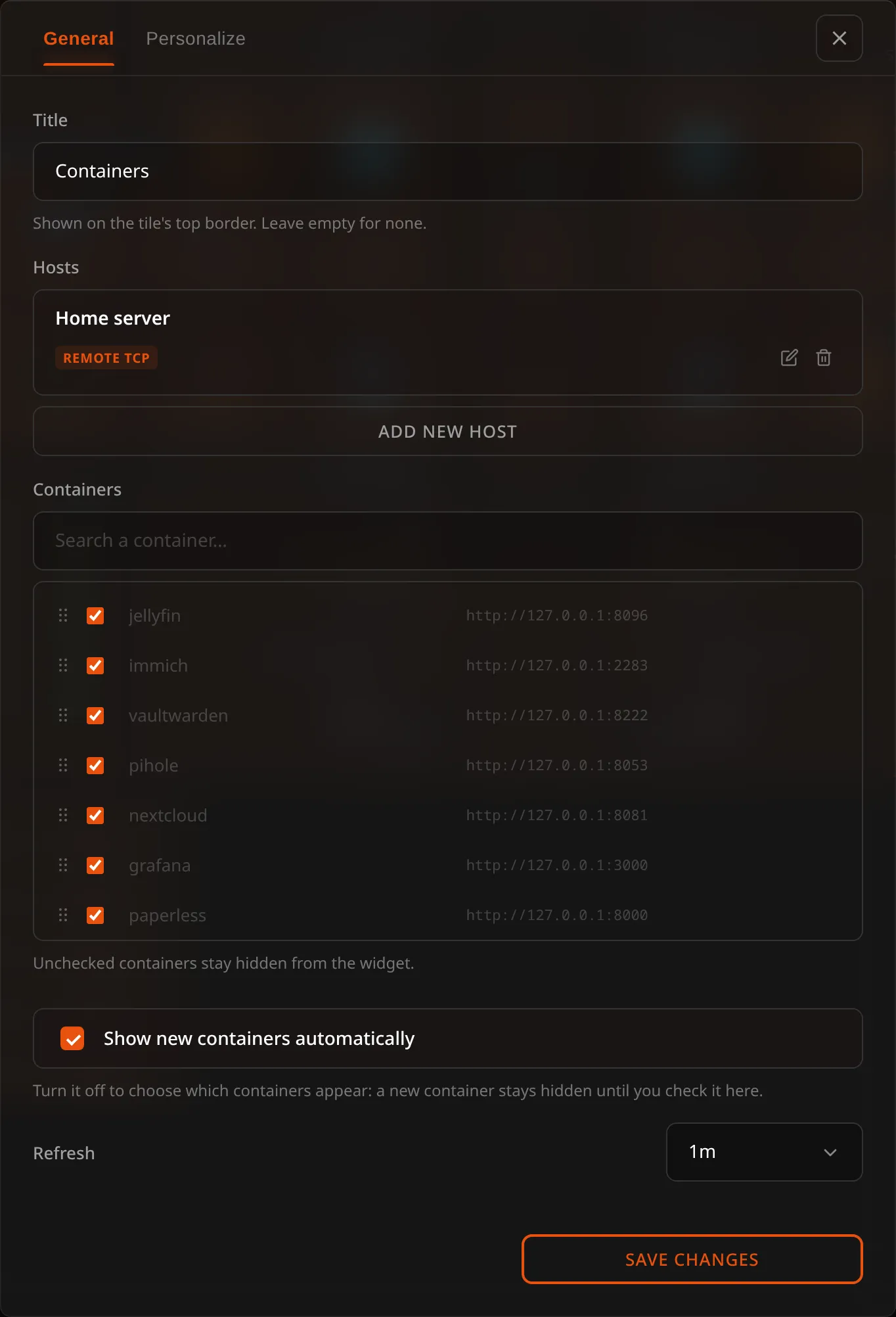
Everything the widget shows is set from its configuration screen: enter the dashboard’s edit mode and open the widget’s settings.
Hosts
You can add as many hosts as you like. Each one has a name, a Connection Type, and — for everything except a local socket — an address. Pick the type first; the fields below it change to match, and so does the port in the example address.
| Connection Type | Address to enter | Default port |
|---|---|---|
| Local socket | nothing — the address field disappears | — |
| Lastboard Agent | 192.168.1.100:2375, plus the agent’s token in its own field | 2375, or whatever you set in the agent’s PORT |
| Remote TCP | 192.168.1.100:2375 | 2375 — an unencrypted Docker daemon |
| Remote TLS | 192.168.1.100:2376 | 2376 — a TLS Docker daemon |
Enter the host and port on their own — Lastboard adds the scheme the connection type needs. The one
scheme kept is https:// on an agent, which means reach it over HTTPS (see the reverse proxy
section above). If you
paste an address that already carries one, the standard forms are understood as written:
tcp://10.0.0.5:2375 is what DOCKER_HOST holds and what docker context ls prints, and
unix:///var/run/docker.sock addresses a socket somewhere other than the default path.
npipe:// and ssh:// are refused with a message rather than tried, since neither can be reached
from here.
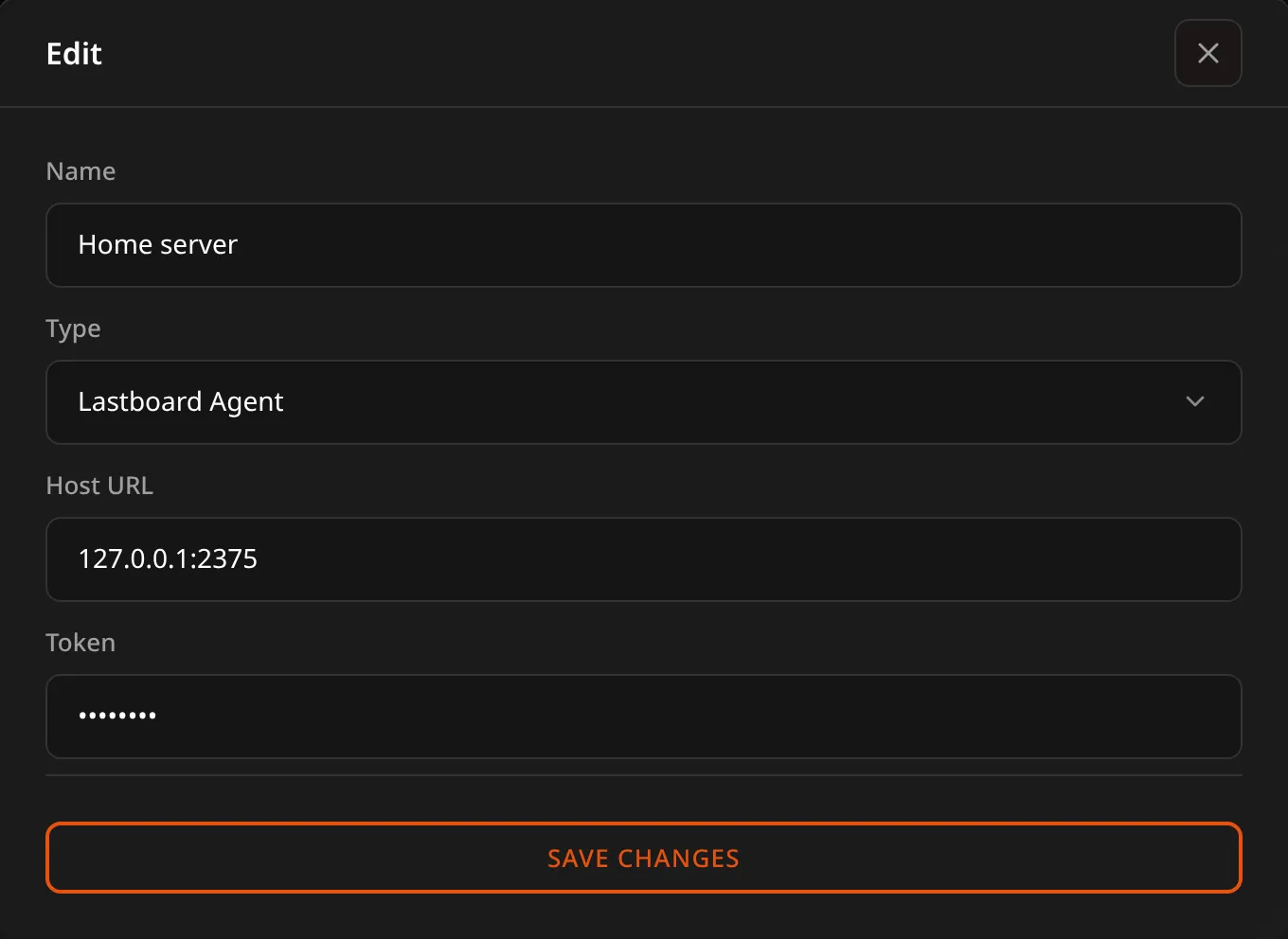
There is no ?token= to type: the token has its own field, which appears only for the agent. It is a secret: once saved it shows as dots and is never shown again — type a new one to replace it, or empty the box to remove it. The token is kept on the Lastboard server apart from the widget, so the board your browser loads never contains it, and a dashboard export leaves it out; a full backup does carry it, so give the backup a password if it will leave your server.
With more than one host configured, the settings screen splits in two: hosts on the left, the selected host’s containers on the right.
Containers
Pick a host on the left and its containers appear on the right, with a search box for long lists. For each one you can:
- Show or hide it with the checkbox. Unchecked containers stay out of the widget.
- Rename it, if the container name isn’t what you want to read on your dashboard.
- Set the address it opens. See Opening a container’s service.
Hosts that don’t answer say so in their own section, and their containers keep whatever you had already set for them.
The widget shows what you ticked, from every host at once — it is one list of the containers you care about, not one host at a time. With more than one host configured, each row names the host it runs on, under the image.
Each row opens with a coloured dot for the container’s state — the same dot the Monitoring widget uses for a service, so a board with both reads one way rather than two. Green is running, grey is stopped, amber is paused, and restarting uses your accent colour; hovering it spells the state out.
When a host stops answering
Its containers don’t disappear from the widget. They stay where they are, greyed out, and the line that normally names the host says it isn’t responding instead — so you can see at a glance which services you’ve lost and which are fine. Their action buttons go away, since there is nothing there to receive the command.
A host that was already down when the dashboard loaded listed nothing, so there are no rows of its to grey out. That one gets a single line naming it and saying it doesn’t answer.
Opening a container’s service
A container’s name in the widget is a link: click it and its web interface opens in a new tab. No bookmark to create by hand for something the widget already lists.
Lastboard works the address out for you, in this order:
- What you typed in the container’s address field, if anything.
- A label on the container.
lastboard.urlis read first, thenhomepage.href— so a container already labelled for another dashboard works here without changes, and you can override it with ours. Onlyhttp://andhttps://addresses are used. - The first published port, combined with the host’s address. For a local host that’s whatever address you’re using to read the dashboard; for a remote one it’s that host’s own address.
A container that publishes no port and carries no label simply isn’t a link — the field shows No published port and its name stays plain text.
The address field is left empty on purpose when the derived one is right: the placeholder shows what will be used, and leaving it alone means the widget keeps following the container. Type something only when you want to override it — a reverse-proxy hostname, for example, or a container reachable on a path.
Example of labelling a container so it advertises its own address:
services:
  jellyfin:
    image: jellyfin/jellyfin
    labels:
      lastboard.url: https://jellyfin.example.home
Arranging the list
Each container in the settings has a grip on its left. Drag a row by it to put the container where you want it, or focus the grip and use the up and down arrow keys. The widget shows the containers in that order. The order is kept for each host, so with several hosts you arrange each one’s list on its own. A container the order doesn’t know yet — a new one — goes after the others until you place it.
New containers
By default a container that appears on a host is shown straight away, and you hide the ones you don’t want. If you only want a few on the widget, turn Show new containers automatically off: from then on a new container stays hidden until you tick it in the settings. Turning it off keeps what is on the widget now; only containers that appear afterwards are held back. Do it while all your hosts are answering: a host that is down can’t be listed, so its containers are not kept.
Updating a container
What you set on a container — hidden, a name, an address — is kept under the container’s name on its host, not its ID. Updating a container recreates it with a new ID, and the settings follow it. (Settings saved by an earlier version were kept by ID and are read as they were until you next save the widget’s settings; a container recreated before that one save had already lost them, and has to be hidden once more.)
Title and refresh
The title is the name on the tile’s top border, the same as on every widget; leave it empty for none. A widget that had no title keeps the name it showed, “Docker”. You can also choose how often the container list is refreshed (30 seconds to 10 minutes). Resource usage for running containers updates continuously regardless of this setting.
Administrator Controls
The administrator can start, stop, or restart containers directly from the widget rows. Members see the same containers and their state, without the controls.