
Documentation / LastHelp / Administration
Keeping the queue readable
On this page
What this protects is not the database. Nothing is published without approval, so spam never reaches a public page. What it protects is your attention: the failure it exists to prevent is a queue so full of rubbish that you stop opening it.
Nothing here calls a third party. No captcha service, no reputation API, no model — what people write in your portal reaches your database and nowhere else.
The layers
- A signed, single-use form token. Fetching the form is what separates somebody who opened the page from a script that found the endpoint, which is what most automated submission is. It turns “fetch the form once, submit for ever” into “fetch the form every time”.
- A timing window. A form filled in under two seconds was not typed; one submitted two hours later is a token somebody kept.
- A honeypot. A field nobody can see. It answers as if it worked, because telling a script which check caught it is telling it what to change.
- Rate limits, on the address your proxy appended and on its block —
/24for IPv4 and/64for IPv6. A single IPv6 customer holds eighteen quintillion addresses, so limiting per exact address is limiting per attempt. - Content heuristics: the same text again (a flood is one paragraph over and over), too many links, and a word list you control — a word that means nothing on your repository is somebody else’s daily traffic. It is edited on the Anti-abuse screen (see below).
- A circuit breaker. Past sixty submissions in an hour a repository stops taking them for a while. Refusing for an hour beats handing you a queue you will not open.
- The moderation queue, which catches what the rest did not.
Pictures
A picture is the easiest thing a stranger can send that costs you something: disk, and the time it takes to look at it. So only the person reporting can attach pictures, with the secret link they get after passing every layer above, and only your team can attach them to its replies. A visitor’s comment carries none.
What can arrive is bounded at every level: five on a report, three on a message, twenty per report all told, 2 MB each, and 512 MB for the whole installation, which refuses new pictures with a message once it is full. Every picture is drawn again from its pixels before it is kept, so a file that only looks like a picture is refused, and one whose header asks for more pixels than the server opens is refused before it is read. Nothing is shown before your team has seen it, and each repository can turn pictures off.
Everything waits for a person
There is no setting that publishes without review, on purpose. Reporting needs no account, so there is no way to know that the second message from somebody comes from the same somebody as the first; “trust whoever was approved before” would be trusting whoever says they are them. With the numbers a self-hosted project actually gets, reviewing everything costs minutes a week.
Knowing whether any of it works
Every refusal is counted by layer and by repository. Look at those numbers occasionally:
- A layer that never refuses anything is a layer to delete.
- A layer that refuses nearly everything is turning away people who did nothing wrong — and those people do not complain, they leave.
The Anti-abuse screen, under This server and for administrators, shows them: a row per repository and check, with how many submissions each turned away. The checks are the hidden field, the form token, the pause a repository takes after too many submissions in an hour, the same text again, too many links, and the word list.
The word list
One list for the whole server, with no language on it. It is a notebook of the words that turn up in your own queue, not a dictionary: you do not need one per language, because the language something arrives in is not yours to choose.
- Add a word or phrase with the form at the top of the list; each one appears as
a row you can edit in place or remove. Capitals and accents do not matter, so
Casinoandcasiñoare one word. A domain or a phrase is a word too. - A word is matched whole: listing
assdoes not refuseclass. Chinese, Japanese, Korean and Thai have no spaces to bound a word, so a word written in them is matched anywhere in a sentence. - It applies to what a stranger writes in a report: the title, the description and the answers to the form. Comments are not checked against it.
- Beside each word is how many reports it has refused. A word that stays at zero is one to take off; take it off and its count goes with it, and a word added again later starts from nothing.
- It takes effect on the next report, without a restart. Up to 500 words of 60 characters, and no commas.
A word that gets a report through to your queue can be added from there: the administrator sees a field beside Reject and Spam, Word that gives it away, and what is typed there is added to the list as the report is turned down. A report that the list already refuses never reaches the queue, so those are read from the counts instead.
What this does not stop
Somebody who has decided to target your project and is willing to work at it by hand. Against that the tools are the breaker, closing submissions for a while, and the fact that nothing is published without a person approving it.
Anyone claiming a spam filter stops a determined human is selling something.
The queue
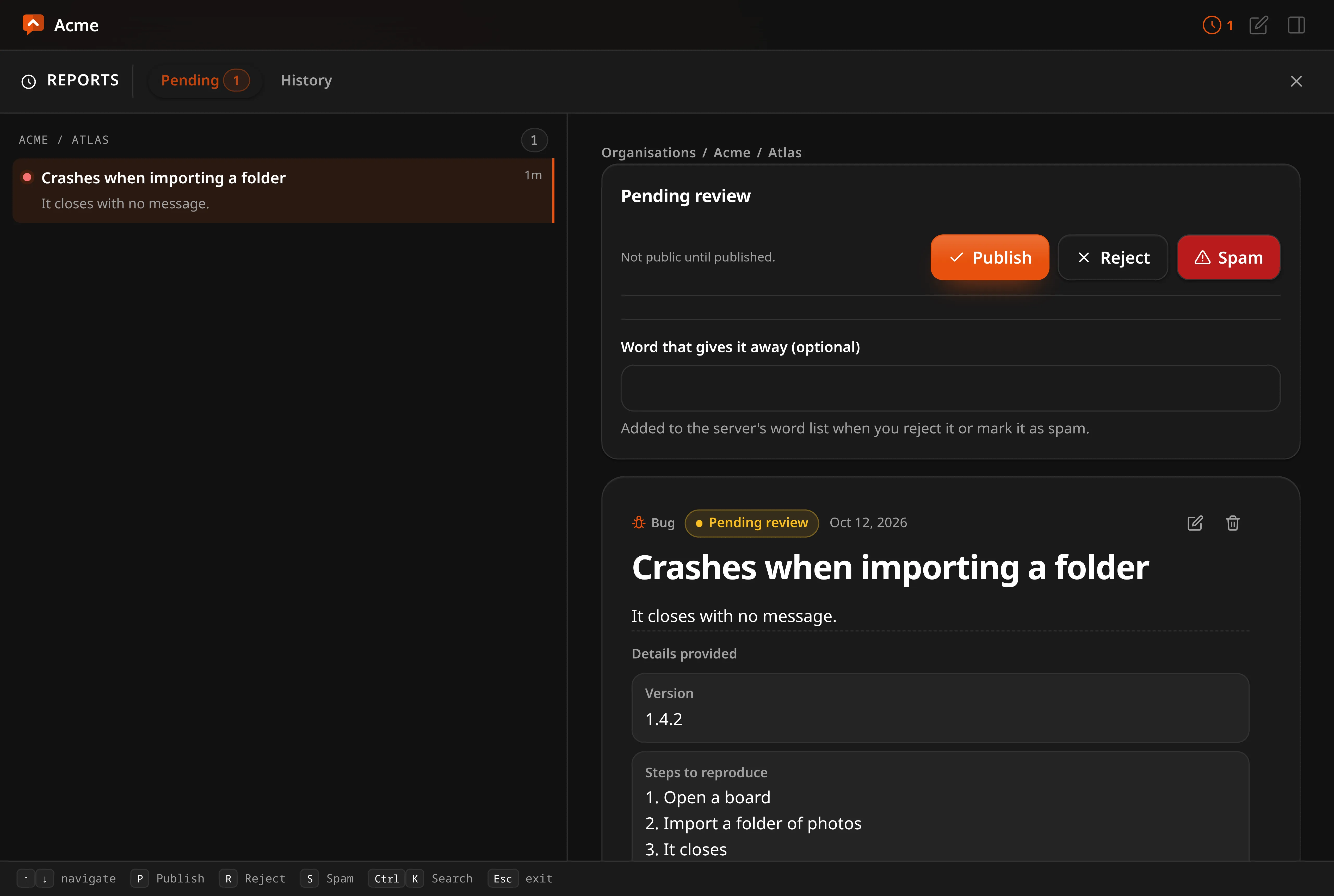
Everything waiting is decided in Reports, the icon in the top bar: every repository you work on in one list, the report beside it, and three buttons — publish, reject, and spam. The arrow keys move down the list. It opens on what is waiting when something is, and on History, every report, otherwise.
The History tab is the archive: every report ever sent, found by its words or narrowed by type, moderation, status and repository. All / Open / Closed splits the published reports the way the public board does, each with how many it would show; under Closed, Done and Not done tell a delivery from a report the team turned down. In the archive the list is grouped by repository, and a repository’s heading folds its reports away and opens them again; the choice is kept in your browser. The queue tab has none of these: whatever waits is shown, closed or not. Whatever you choose opens beside the list as the whole report — edit its words, change its status, open or link an issue, reply, edit or delete any comment on it, and, for the organisation’s leads and the administrator, delete the report itself. Each repository’s page in the panel opens the same screen filtered to that repository.
With four repositories you will see between zero and five things a week, which is why there are no bulk actions: anything that assumes scale on this side is weight you carry for a situation you do not have.
Comments wait in the same place, listed under the reports with the report each one was written on. They are held for the same reason: the page tells whoever writes one that a person will read it before it appears, and a portal where a stranger can publish straight onto somebody else’s report is a portal you would have to watch. Your own replies are not held — you are the person.